---
title: "循序渐进写一个Servlet(3) - 分别处理GET和POST"
source: https://www.boris1993.com/java-servlet-3-handle-get-and-post.html
date: 2019-03-08
updated: 2026-10-10
tags: [Java, Servlet]
categories: [学知识]
---
# 循序渐进写一个Servlet(3) - 分别处理GET和POST
Servlet(Server Applet),全称Java Servlet,是用Java编写的服务器端程序。其主要功能在于交互式地浏览和修改数据,生成动态Web内容。本系列将一步步地写出一个Servlet程序。
这篇博文将演示如何分别处理`GET`和`POST`请求,以及处理请求中的参数。
# 编写`doGet()`和`doPost()`方法
首先把要实现的功能写好,后面才好调用不是。
```java
public void doGet(HttpServletRequest request, HttpServletResponse response) throws IOException {
// 设定返回内容的MIME类型
response.setContentType("text/html");
// 设定内容以UTF-8编码
response.setCharacterEncoding("utf-8");
try (PrintWriter writer = response.getWriter()) {
// 开始输出HTML文本
writer.print("");
writer.print("");
writer.print("Response from DemoServlet");
writer.print("Handled by doGet()");
writer.print("");
writer.print("");
}
}
```
```java
public void doPost(HttpServletRequest request, HttpServletResponse response) throws IOException {
// 设定返回内容的MIME类型
response.setContentType("text/html");
// 设定内容以UTF-8编码
response.setCharacterEncoding("utf-8");
try (PrintWriter writer = response.getWriter()) {
// 开始输出HTML文本
writer.print("");
writer.print("");
writer.print("Response from DemoServlet");
writer.print("Handled by doPost()");
writer.print("");
writer.print("");
}
}
```
# 区分HTTP方法
因为servlet是调用`service()`方法来处理请求的,所以对请求做区分也需要在`service()`方法中进行。
```java
@Override
public void service(ServletRequest req, ServletResponse res) throws ServletException, IOException {
HttpServletRequest httpServletRequest = (HttpServletRequest) req;
HttpServletResponse httpServletResponse = (HttpServletResponse) res;
if ("GET".equalsIgnoreCase(httpServletRequest.getMethod())) {
doGet(httpServletRequest, httpServletResponse);
} else if ("POST".equalsIgnoreCase(httpServletRequest.getMethod())) {
doPost(httpServletRequest, httpServletResponse);
} else {
// 如果请求既不是GET也不是POST
// 那么就返回HTTP 501 NOT IMPLEMENTED状态码
// 毕竟不能把请求直接扔了,总是要有个返回的
httpServletResponse.sendError(501);
}
}
```
# 运行起来看看效果
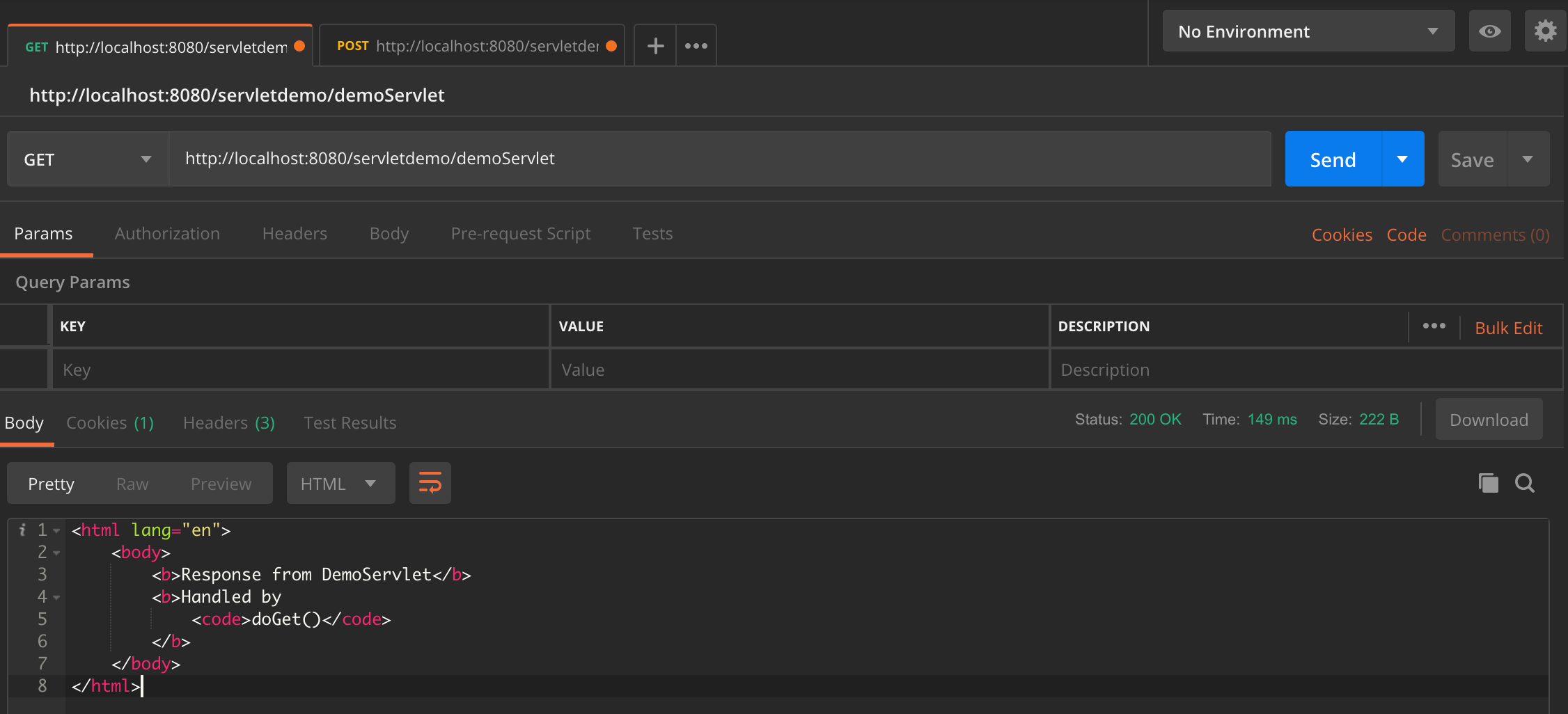
首先发个`GET`请求
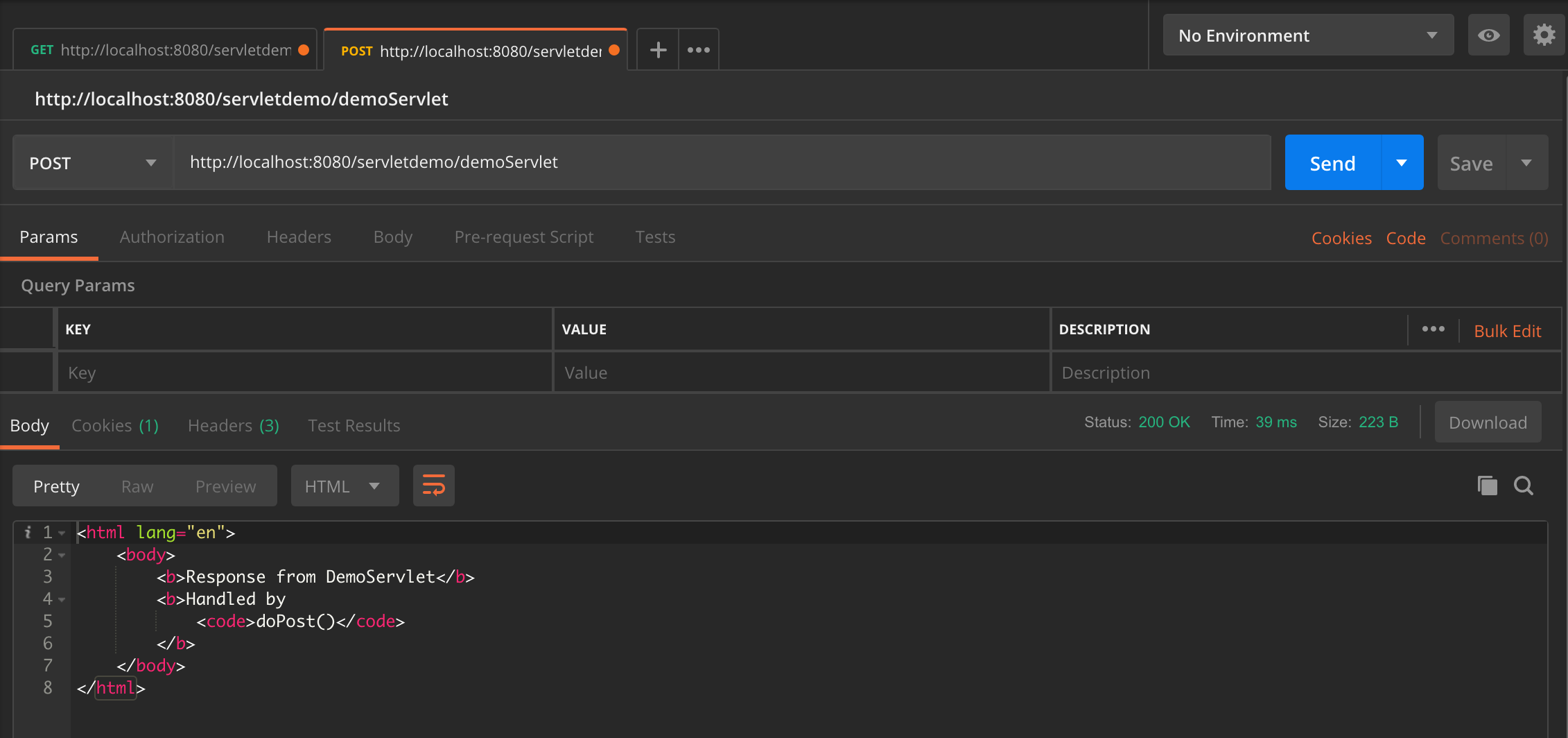
再发个`POST`请求
# 为什么不用`HttpServlet`类呢
没错,上面做的,就是自己实现了一个简陋的`HttpServlet`类,因为是循序渐进嘛,没头没脑的直接砸上来一个,算什么循序渐进。
那么现在就让`DemoServlet`继承`HttpServlet`。同时,因为`HttpServlet`已经在`service()`方法中实现了判断请求类型,所以`DemoServlet`中不要覆盖`service()`方法,只覆盖`doGet()`和`doPost()`方法。
```java
public class DemoServlet extends HttpServlet {
@Override
public void doGet(HttpServletRequest request, HttpServletResponse response) throws IOException {
// 设定返回内容的MIME类型
response.setContentType("text/html");
// 设定内容以UTF-8编码
response.setCharacterEncoding("utf-8");
try (PrintWriter writer = response.getWriter()) {
// 开始输出HTML文本
writer.print("");
writer.print("");
writer.print("Response from DemoServlet");
writer.print("Handled by doGet()");
writer.print("");
writer.print("");
}
}
@Override
public void doPost(HttpServletRequest request, HttpServletResponse response) throws IOException {
// 设定返回内容的MIME类型
response.setContentType("text/html");
// 设定内容以UTF-8编码
response.setCharacterEncoding("utf-8");
try (PrintWriter writer = response.getWriter()) {
// 开始输出HTML文本
writer.print("");
writer.print("");
writer.print("Response from DemoServlet");
writer.print("Handled by doPost()");
writer.print("");
writer.print("");
}
}
}
```
# 处理请求中的参数
HTTP请求是可以带参数的,有了参数,那就得处理。
## 处理`GET`请求的参数
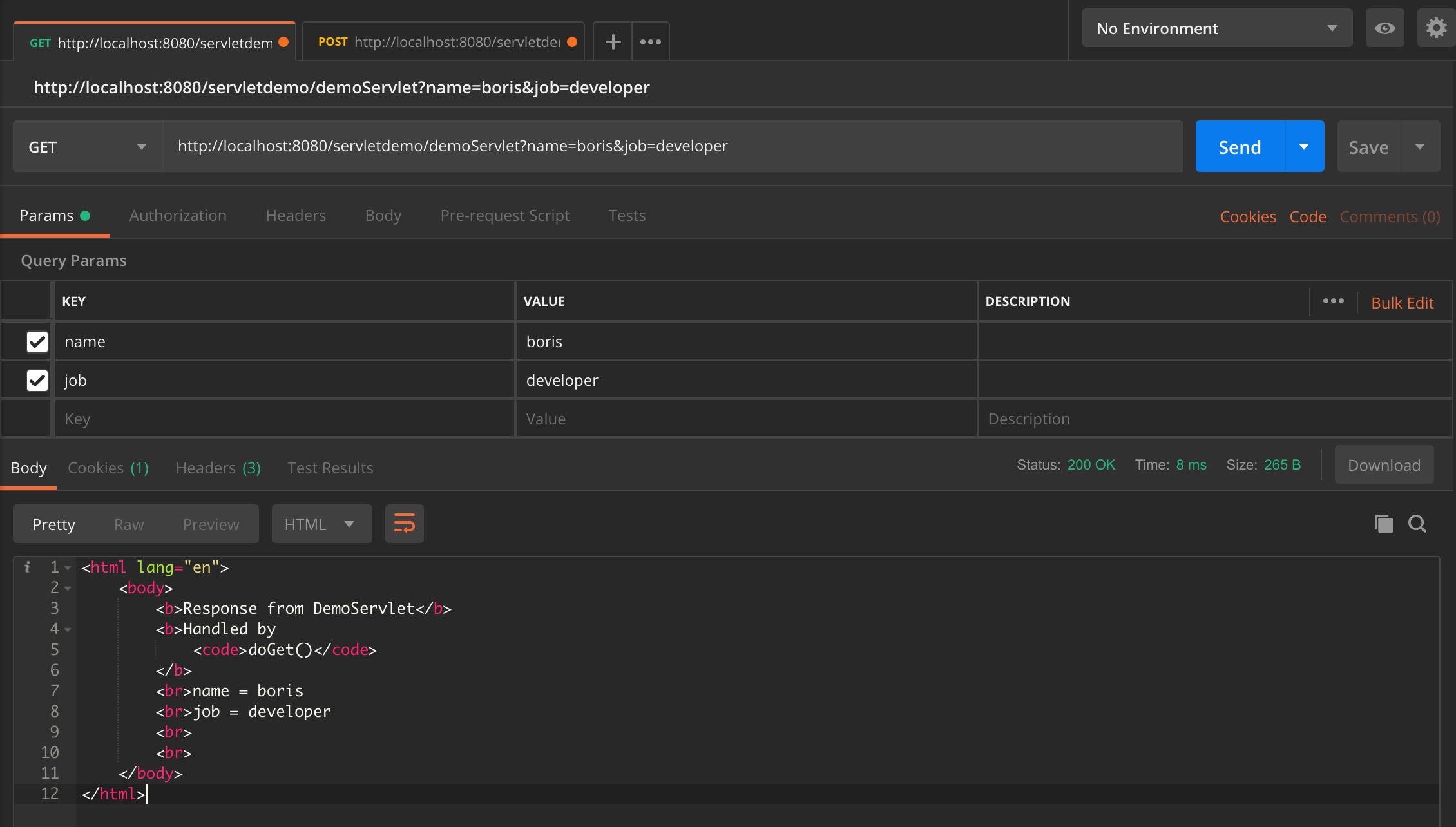
`GET`请求里带的参数,名字叫`查询字符串(query string)`,是一组或多组`key=value`格式的键值对。
Query string写在URL后面,以一个问号起头,用`&`分隔各个键值对,即类似`http://localhost:8080/appname/servlet?arg1=value1&arg2=value2&...&argN=valueN`。
在代码里使用`HttpServletRequest#getQueryString()`方法,就可以获取到问号后面的query string,分别用`&`和`=`分割字符串,就可以取到每个参数的key和value。
```java
@Override
public void doGet(HttpServletRequest request, HttpServletResponse response) throws IOException {
// 设定返回内容的MIME类型
response.setContentType("text/html");
// 设定内容以UTF-8编码
response.setCharacterEncoding("utf-8");
/*
String queryString = request.getQueryString();
String[] queryStrings;
if (queryString != null) {
queryStrings = queryString.split("&");
} else {
queryStrings = new String[]{};
}
*/
// 使用Optional类简化null判断
Optional optionalQueryString = Optional.ofNullable(request.getQueryString());
// 如果有query string则取出每个参数
// 如果没有则返回一个空的String数组
String[] queryStrings = optionalQueryString.isPresent() ? optionalQueryString.get().split("&") : new String[]{};
try (PrintWriter writer = response.getWriter()) {
// 开始输出HTML文本
writer.print("");
writer.print("");
writer.print("Response from DemoServlet");
writer.print("Handled by doGet()");
writer.print("
");
// 遍历每个参数
for (String query : queryStrings) {
// 取出参数的key和value
String[] q = query.split("=");
writer.print(q[0] + " = " + q[1] + "
");
}
writer.print("
");
writer.print("");
writer.print("");
}
}
```
运行一下,结果是这样子的:
## 处理`POST`请求的参数
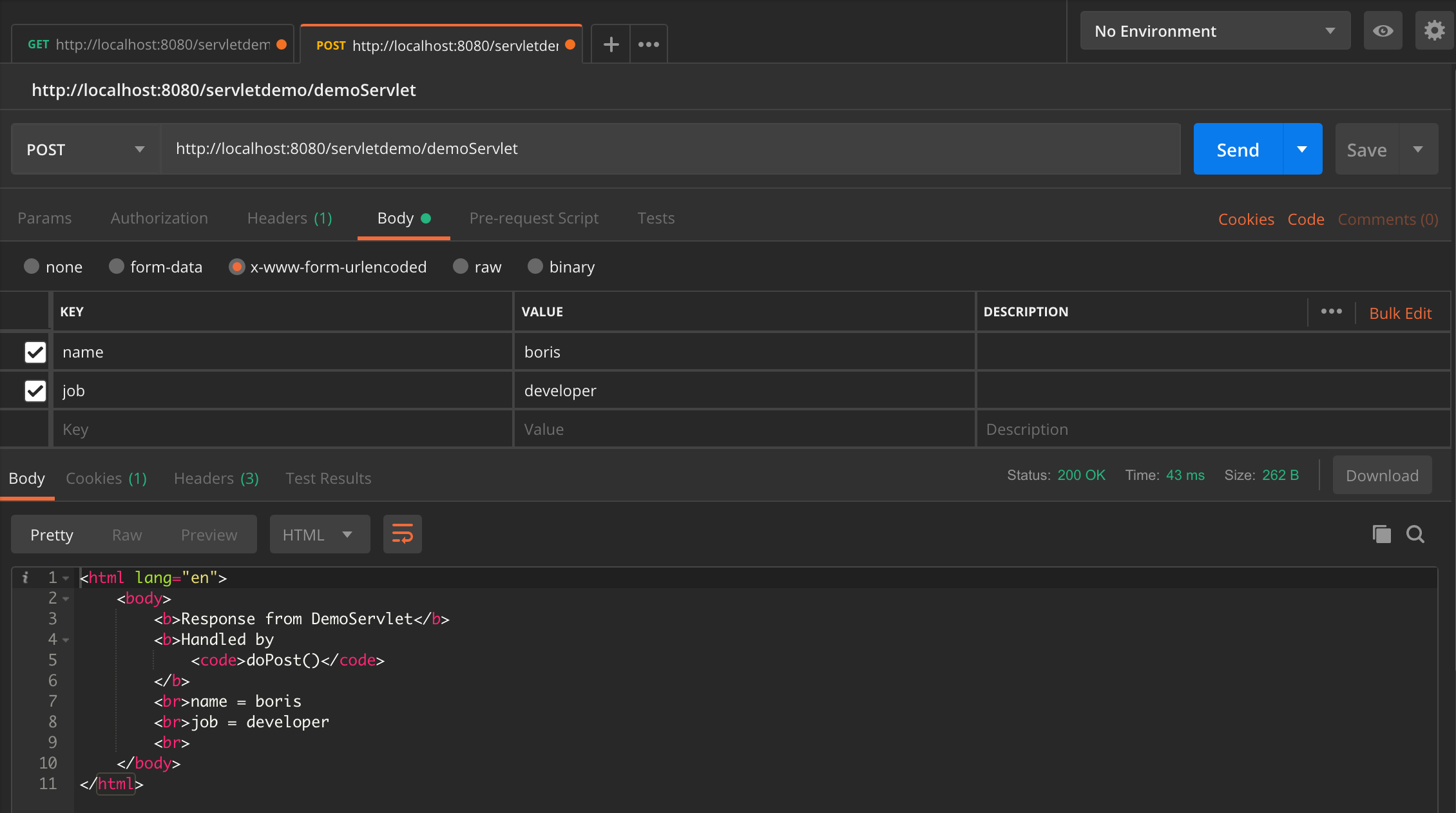
`POST`请求的参数就叫参数(parameter),位于请求体(body)里,格式由`Content-Type`请求头决定。详细介绍可以参考这篇MDN文档。
`HttpServletRequest#getParameterMap()`方法可以取出请求中的所有参数,并放到一个Map中。
```java
@Override
public void doPost(HttpServletRequest request, HttpServletResponse response) throws IOException {
// 设定返回内容的MIME类型
response.setContentType("text/html");
// 设定内容以UTF-8编码
response.setCharacterEncoding("utf-8");
// 取出所有参数,得到一个Map
Map parameterMap = request.getParameterMap();
try (PrintWriter writer = response.getWriter()) {
// 开始输出HTML文本
writer.print("");
writer.print("");
writer.print("Response from DemoServlet");
writer.print("Handled by doPost()");
writer.print("
");
// 遍历parameterMap
parameterMap.forEach((k, v) -> writer.print(k + " = " + ((String[]) v)[0] + "
"));
writer.print("");
writer.print("");
}
}
```
本文中将使用`application/x-www-form-urlencoded`格式做示例。
# 系列博文
- [循序渐进写一个Servlet(1) - 介绍相关的接口和类](https://www.boris1993.com/projects/java/Servlet/java-servlet-1-introducing-classes-and-interfaces.html)
- [循序渐进写一个Servlet(2) - 第一个servlet](https://www.boris1993.com/projects/java/Servlet/java-servlet-2-first-servlet.html)
- [循序渐进写一个Servlet(3) - 分别处理GET和POST](https://www.boris1993.com/projects/java/Servlet/java-servlet-3-handle-get-and-post.html)
- [循序渐进写一个Servlet(4) - 会话追踪](https://www.boris1993.com/projects/java/Servlet/java-servlet-4-session-tracking.html)
- [循序渐进写一个Servlet(5) - Filter](https://www.boris1993.com/projects/java/Servlet/java-servlet-5-filter.html)